
Editor Controls
Configure editor capabilities, variable syntax, and font options for an Application.
Editor Controls configures the editing rules available to End Users in one Application.
Use this page to define variable syntax and the variables that End Users can insert into email content.
Variables
Variables are placeholders used in email content.
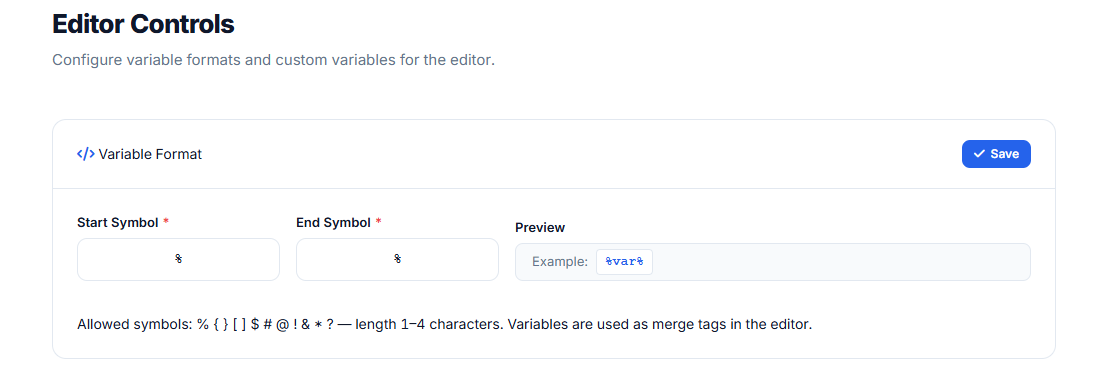
Your End Users insert variables while designing the email. Your own system replaces those variables with real recipient data when the email is sent.
Example:
Hello {{first_name}},Your sending system can later replace {{first_name}} with the recipient's first name.
Variable delimiters
Choose the delimiter style that matches your existing template or sending system.
| Style | Example |
|---|---|
| Double braces | {{first_name}} |
| Single braces | {first_name} |
| Percent format | %%first_name%% |
| Custom | Use the delimiters supported by your system. |
Use a syntax that your sending platform can process safely.
Custom variables
Custom variables make it easier for End Users to insert approved placeholders.
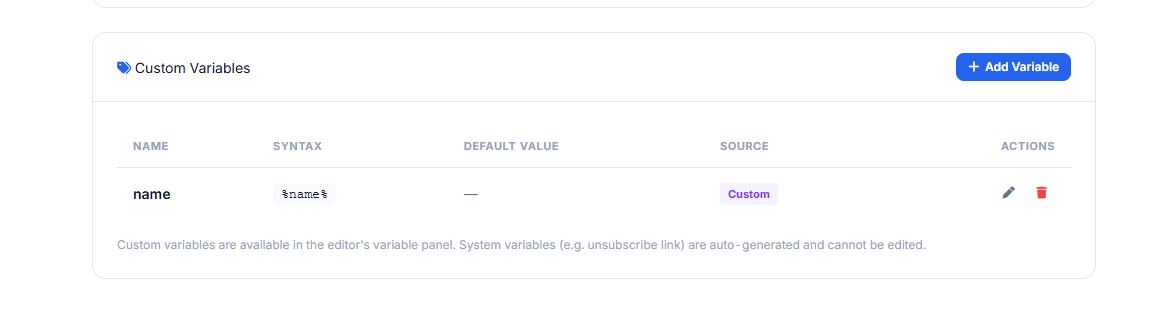
Each variable should include:
| Field | Description |
|---|---|
| Label | Human-readable name shown in the editor. |
| Variable name | The placeholder key inserted into email content. |
| Example value | Optional sample value used for preview or guidance. |
Example:
| Label | Variable name | Inserted value |
|---|---|---|
| First Name | first_name | {{first_name}} |
| Last Name | last_name | {{last_name}} |
| Order ID | order_id | {{order_id}} |
| Company Name | company_name | {{company_name}} |
How variables are returned
Variables remain in the saved email content.
When ASC Editor Plugin sends saved content to your Push URL, the HTML still contains the configured variable syntax.
Your backend or sending platform is responsible for replacing variables with real values before sending.
Editor feature controls
Some editor capabilities may be controlled by your Application plan or product configuration.
Examples include:
- AI email generation
- AI rewrite
- Inbox Preview
- HTML import
- Template access
If a feature is unavailable, it may be hidden from the editor UI or disabled for End Users.
Recommendations
- Keep variable names stable after End Users start using them.
- Use variable names that match your sending system.
- Avoid special characters that your template engine cannot process.
- Test saved HTML through your own sending workflow before production use.
Updated 4 months ago